Free
Contrast Checker
IncludePress measures text contrast in the admin browser, on the Scans screen, when you click Run browser checks. That check never loads on your visitors’ pages.
What the free checker flags
- Normal text below 4.5:1
- Large text below 3:1. Large means 24px, or 18.67px at bold weight
- Text drawn over an image, listed as “Check contrast over image.” because a single ratio is not enough
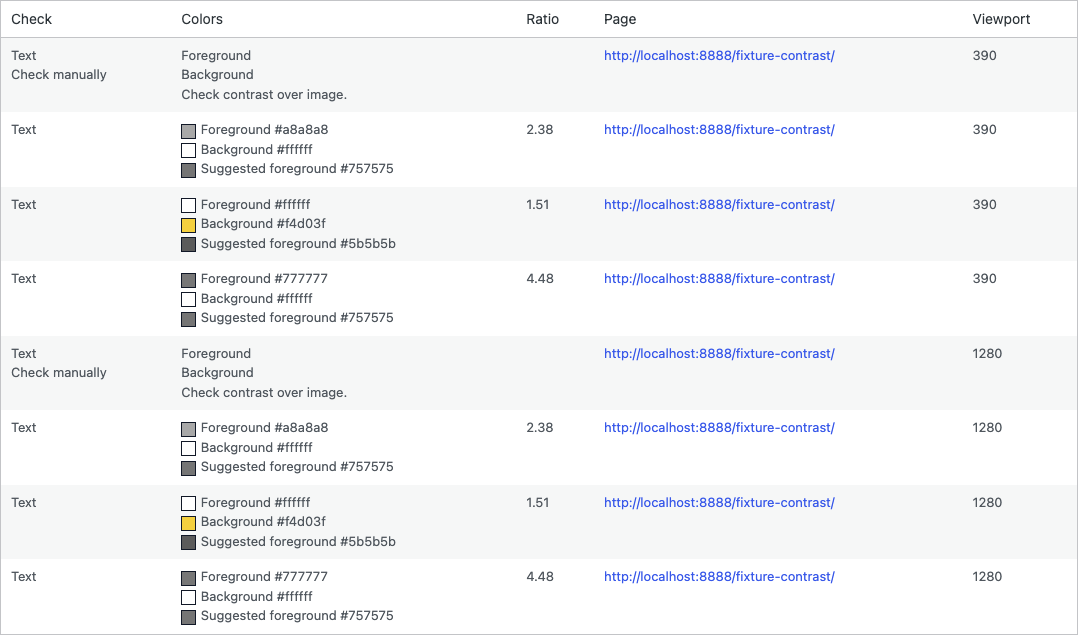
Each row shows a color swatch and the hex beside it, plus the ratio. A suggested foreground keeps the same hue and meets the threshold. The local fixture uses gray body text at 4.48:1, white text on yellow at 1.51:1, and placeholder gray at 2.38:1. A 32px line at about 3.2:1 passes the large-text threshold, so it is not listed. That page is not published on this site.
The Contrast Checker screen
This screenshot is from a local WordPress admin. The marketing site does not run the checker. Desktop is viewport 1280. Mobile is viewport 390.
Limitation. The free checker finds the contrast problem. Changing the color in the content is a later step.